

On This Page
Search behavior is changing faster than most reporting dashboards can explain.
For years, SEO performance was judged through a familiar chain: rankings created impressions, impressions earned clicks, and clicks became leads or sales. That model still matters, but it no longer tells the whole story.
AI Overviews and AI Mode now influence how people discover information, compare options, and decide which brands deserve a closer look. In many searches, users may get a summarized answer before they ever reach a website.
That creates a measurement problem. Not because SEO has stopped working, but because visibility is no longer limited to ten blue links. And Google addressed part of that problem in June 2026 by launching dedicated Search Console generative AI performance reports for Search and Discover.
In this blog post, we’ll explore how to measure AI Overviews and AI Mode visibility in Google Search Console, how to interpret AI impressions, and how to connect AI search visibility to meaningful SEO and business outcomes.
Without further ado, let’s get started!
What Google Search Console Reports for AI Overviews and AI Mode
Google’s Generative AI performance report for Search shows how a site performs in generative AI features on Google Search. According to Google’s documentation, the report includes impressions for AI Overviews and AI Mode, while data from Search Labs experiments is excluded because those experiments are still in development.
That distinction is important.
The report does not show every prompt, every AI-generated answer, every competitor citation, or every brand mention. It also should not be treated like a traditional keyword ranking report.
What it does show is more practical: where links to your site were shown to users inside supported generative AI features on Google Search.
Google says the report can help site owners see how organic impressions from generative AI features change over time, which pages get the highest or lowest impressions, and where impressions originate by device or country.
At a basic level, you can review:
- Pages receiving AI-search impressions
- Countries where those impressions appear
- Device distribution
- Date-based changes over time
- Exported report data for deeper analysis
Think of it as a visibility report first. It tells you when your content is being surfaced in Google’s AI search experiences. To understand whether that visibility leads to traffic, leads, pipeline, or revenue, you need to connect it with other reports.
[Also Read: Optimizing Your SEO Content Strategy for Google’s AI Mode]
Why AI Search Visibility Needs Its Own Measurement Layer
AI search can influence the buyer journey without producing the same click pattern as traditional organic results.
A user might see your page referenced or linked in an AI Overview, absorb the answer, search your brand later, visit directly, or return through a paid ad. Another user might compare service providers in AI Mode, narrow their options, and only click when they are closer to making a decision.
That makes SEO reporting more complicated. But not impossible.
The data also suggests that AI summaries can change click behavior. Pew Research Center found that users who encountered an AI-generated summary clicked a traditional search result in 8% of visits, compared with 15% of visits where no AI summary appeared. Ahrefs, in a separate analysis of 300,000 keywords, reported that AI Overviews correlated with a 34.5% lower average click-through rate for the top-ranking page on informational keywords.
Those studies should not be read as universal laws. Click behavior varies by industry, intent, device, query type, and brand strength. Still, the direction is clear enough: AI search visibility cannot be evaluated only by direct clicks.
A better question is:
Are we visible when Google’s AI features help users understand problems, compare solutions, and decide what to do next?
That is the layer Google Search Console now helps you measure, and here’s how you can do it.
Step 1: Check Whether You Have Access to the Generative AI Performance Report
Start inside Google Search Console.
Open your property and look for the Generative AI performance report under Performance. If you don’t see it, that doesn’t automatically mean something is wrong.
Google says the report is being rolled out to a subset of website owners. A property may not have access because the rollout has not reached it yet, or because the site has not received enough impressions in supported generative AI features on Google Search. Google also notes that sites excluded from Search generative AI features may not be eligible to appear there.
This is worth stressing: the absence of the report doesn’t prove that your SEO strategy has failed.
For smaller sites, niche B2B companies, local businesses, or newer domains, there simply may not be enough AI feature visibility yet to populate a separate report. Keep improving the site, keep tracking standard Search Console performance, and check again periodically.
Also avoid reacting by creating thin “AI-optimized” pages. Google’s guidance is clear that traditional SEO best practices still apply for AI features in Search, including AI Overviews and AI Mode.
[Also Read: GEO Explained: How to Keep Your Brand Seen in AI Search]
Step 2: Build a Baseline for AI Search Impressions
Once the report is available, the first job is measurement.
Choose a date range that gives you enough data to see a pattern. For most sites, the last 28 days, last 3 months, or last full quarter will be more useful than a short daily snapshot.
Then record a simple baseline:
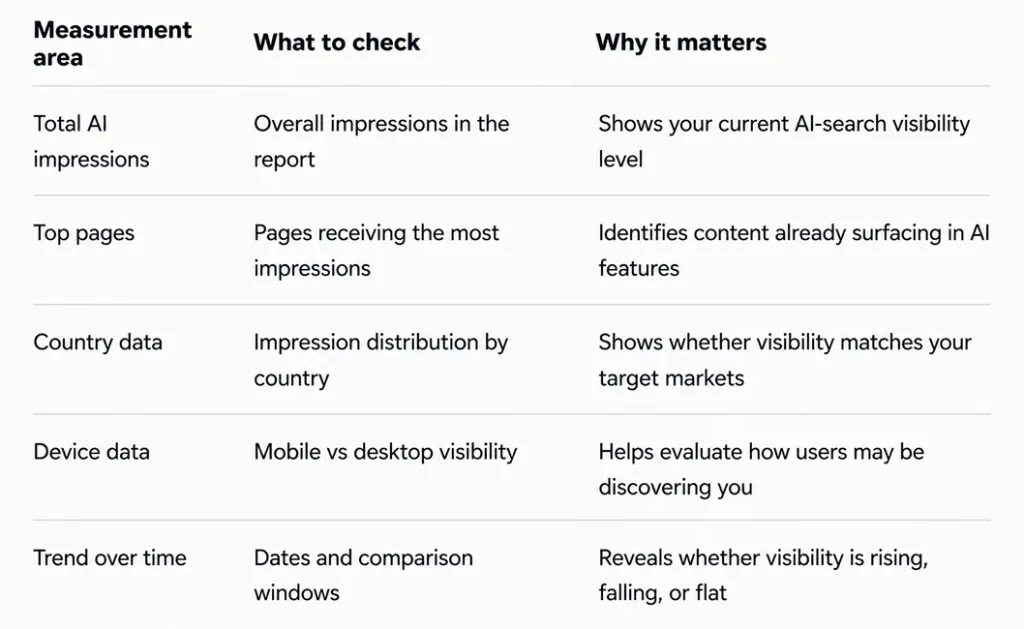
This baseline gives you a reference point. Without it, every increase looks exciting, and every drop feels alarming.
A practical note: Google’s Search Console data can be delayed or adjusted, and very recent data may not be final. So use daily numbers carefully. For strategy decisions, trends are more useful than one-day fluctuations.
Step 3: Identify Which Pages Are Appearing in AI Search Features
The Pages tab is where the report becomes useful. Google explains that the Pages dimension groups data by the final URL linked by a generative AI feature after redirects. Search Console commonly assigns performance data to the canonical URL Google chooses for a page, which means duplicate or alternate versions may not always appear the way you expect.
Once you export or review your top AI-visible pages, classify them by purpose.
- Blog posts: The content may answer informational or research-heavy queries
- Service pages: Users may be evaluating commercial options
- Product pages: AI search may be supporting product comparison or shopping research
- Location pages: Local relevance may be appearing in complex local searches
- Guides or resources: The content may be treated as supporting evidence or explanation
This classification matters because not every AI-visible page should be judged the same way.
A how-to article may be valuable because it earns early-stage visibility and introduces your brand to a future buyer. A service page, on the other hand, should be evaluated more directly against conversions, calls, demo requests, or qualified inquiries.
The mistake is treating all AI impressions as equal. They are not.
Some impressions create awareness. Some support evaluation. A smaller number may sit close to conversion.
[Also Read: How to Structure Content That Gets Pulled Into Featured Snippets?]
Step 4: Compare AI Visibility With Standard Search Performance
The generative AI report should sit next to your standard Search performance report, not replace it.
Google’s standard Search performance report shows clicks, impressions, CTR, and average position for Google Search results. It can also be broken down by queries, pages, countries, devices, dates, and search appearance where applicable. Google also states that sites appearing in AI features are included in overall Search traffic in Search Console.
A useful workflow looks like this:
- Export your top AI-visible pages from the generative AI report.
- Open the standard Search results Performance report.
- Filter by those same URLs.
- Compare total impressions, clicks, CTR, average position, and queries.
- Look for gaps between AI visibility and traditional organic performance.
The gaps are often the most interesting part.
A page with rising AI impressions and flat clicks may still be gaining visibility in answer-heavy journeys. A page with growing AI visibility and improving branded search demand may be influencing awareness. A page with strong AI impressions but weak conversions may need better internal links, clearer next steps, or stronger proof.
You can also create an internal metric:
AI visibility share = Generative AI impressions ÷ Total Web Search impressions
This is not an official Google metric. It is a reporting lens. It helps you understand how much of a page’s search visibility is coming from AI-led experiences versus broader web search.
Use it carefully, but use it!
Step 5: Understand How AI Overviews and AI Mode Are Counted
Before you report AI performance to leadership, make sure everyone understands how Search Console counts these features.
Google says clicks, impressions, and position for AI Overviews follow standard Search Console logic. A click is counted when a user clicks a link to an external page. An impression is counted when the link is scrolled or expanded into view. Google also says an AI Overview occupies one position in the search results, and all links inside that AI Overview are assigned that same position.
That has two implications.
First, the average position may not behave the way marketers expect. If multiple links appear in the same AI Overview, they may share the same position. You should not interpret that exactly like a normal blue-link ranking.
Second, not every AI-generated response creates an impression for your site. If your link is not visible to the user, or if it is hidden behind an expansion the user never opens, it may not be counted as an impression.
AI Mode adds another layer. Google says that when a user asks a follow-up question in AI Mode, that follow-up is counted as a new query in Search Console.
So yes, the data is useful. But it needs interpretation.
Avoid false precision. Use the report to understand visibility patterns, then combine it with analytics, CRM data, and content review.
Step 6: Segment AI Visibility by Country and Device
Country and device data can reveal whether your AI visibility is actually useful.
For example, a U.S. only service business may not benefit much from a spike in impressions from countries it does not serve. A software company expanding internationally may find that AI impressions are growing in markets where it has not yet localized its content. An e-commerce site may discover that mobile AI impressions are growing faster than desktop visibility, which makes mobile product pages and checkout friction even more important.
Ask a few simple questions:
- Are AI impressions coming from markets we actually serve?
- Are priority locations or regions represented?
- Is mobile visibility growing faster than desktop?
- Do AI-visible pages match the needs of users in those markets?
- Are pricing, proof, examples, and calls to action relevant for those audiences?
Visibility is only valuable when it connects to the right audience.
This is especially important for local businesses and multi-location brands. If AI search is surfacing your content for broad or mismatched geography, the content may need clearer service-area signals, better location-page structure, or stronger local entity consistency.
Step 7: Connect AI Visibility to Leads, Sales, and Revenue Quality
Search Console can tell you where visibility is happening. It cannot tell the entire business story.
To understand whether AI search visibility matters, connect it to analytics and sales data.
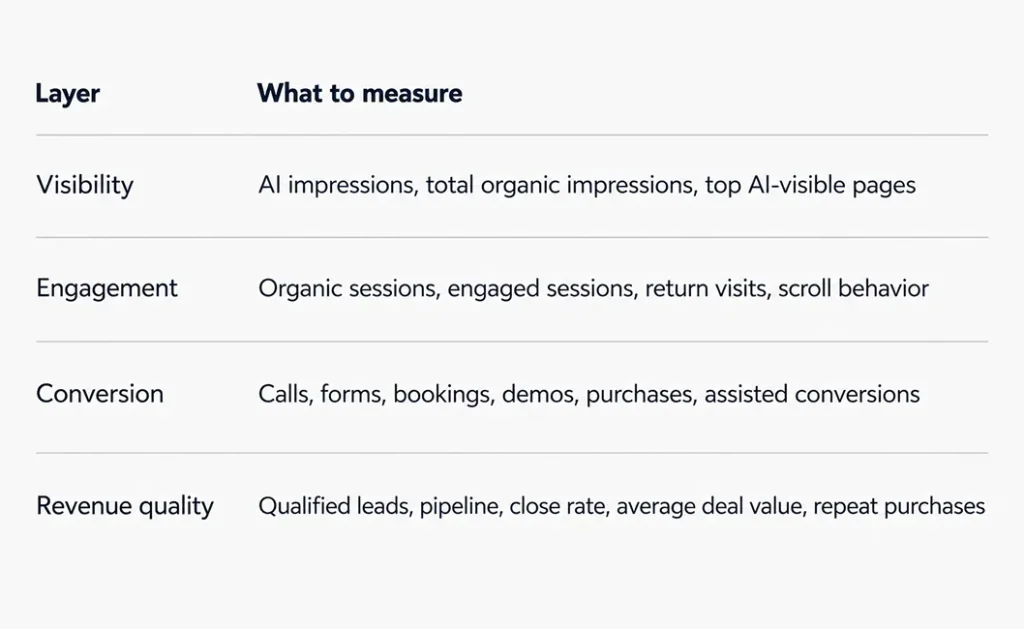
For B2B and service businesses, lead quality is especially important. A page can produce traffic and still attract the wrong audience. Another page may bring fewer visitors but generate better conversations with serious buyers.
That is why AI visibility should not be reported in isolation.
A strong monthly insight might sound like this:
“AI impressions increased across three informational guides, but conversions remained flat. The next step is to strengthen internal links from those guides to relevant service pages and add clearer decision-stage sections for readers comparing providers.”
That is useful.
“AI impressions are up 18%” is only a number.
[Also Read: Measuring ROI from SEO: A Guide for SMBs]
Step 8: Be Careful With Third-Party AI Visibility Tools
Third-party AI visibility tools can be helpful, especially when you want to monitor brand mentions, prompt-level citations, or visibility across platforms outside Google Search.
But they should not be treated as the absolute truth.
Google warns site owners to be wary of third-party tools that promise ranking success or claim access to internal Google metrics, because those tools do not have access to Google’s internal ranking or AI systems.
The better approach is to use each data source for what it does best.
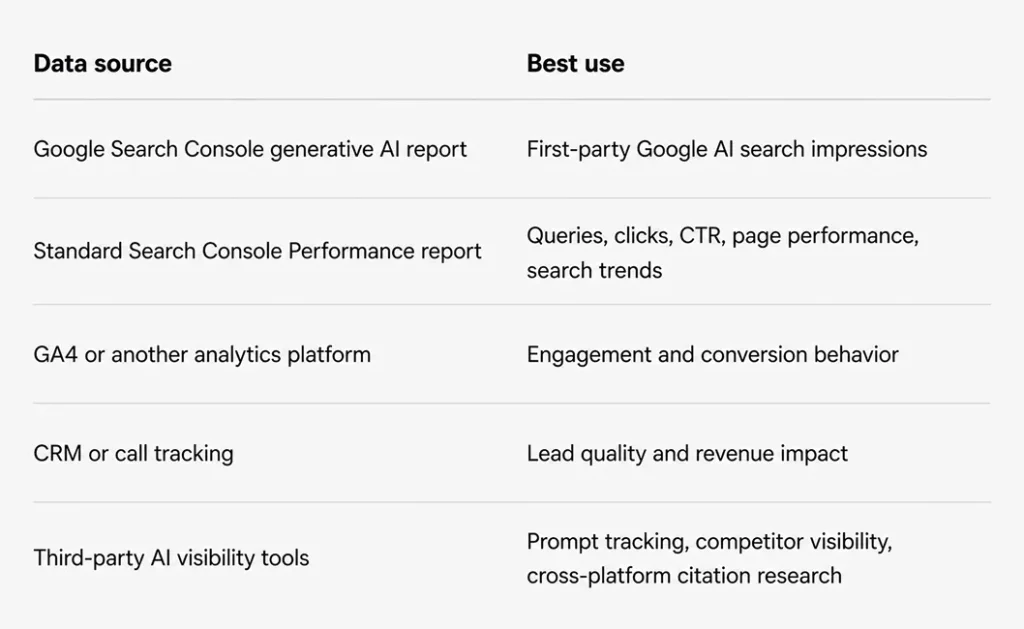
This combination gives you a more complete view.
Search Console tells you what happened inside Google. Analytics shows what users did after arriving. CRM data tells you whether those users turned into real business. Third-party tools can help fill context gaps, especially outside Google’s ecosystem.
No single dashboard can replace that full picture.
[Also Read: Top 09 Rank Tracking Tools You Need for SEO Success]
Step 9: Improve Pages That Already Have AI Visibility
Once you identify pages receiving generative AI impressions, prioritize improvement.
Do not start by chasing myths.
Google’s guidance for AI features emphasizes that standard SEO best practices remain relevant. That includes making content crawlable, using clear text, building helpful pages, matching structured data to visible content, improving page experience, and supporting content with useful images or videos where appropriate.
Review each AI-visible page and ask:
- Does the page answer the core question clearly?
- Is the explanation specific, current, and useful?
- Are important claims backed by credible sources or firsthand insight?
- Does the page include examples, comparisons, tables, or decision criteria?
- Are the next steps clear for readers who want help, pricing, a quote, or deeper information?
- Is the page internally linked to related commercial pages?
- Is key content available as readable text rather than hidden in images or scripts?
- Does structured data match what users can actually see on the page?
The goal is not to write for an AI system instead of a human. The goal is to make the page easier to understand, trust, cite, and act on.
That is good SEO. It is also good AI-search preparation.
Step 10: Create a Monthly AI Search Visibility Report
A monthly AI search report does not need to be long. It needs to be clear.
Here are some common sections you can include:
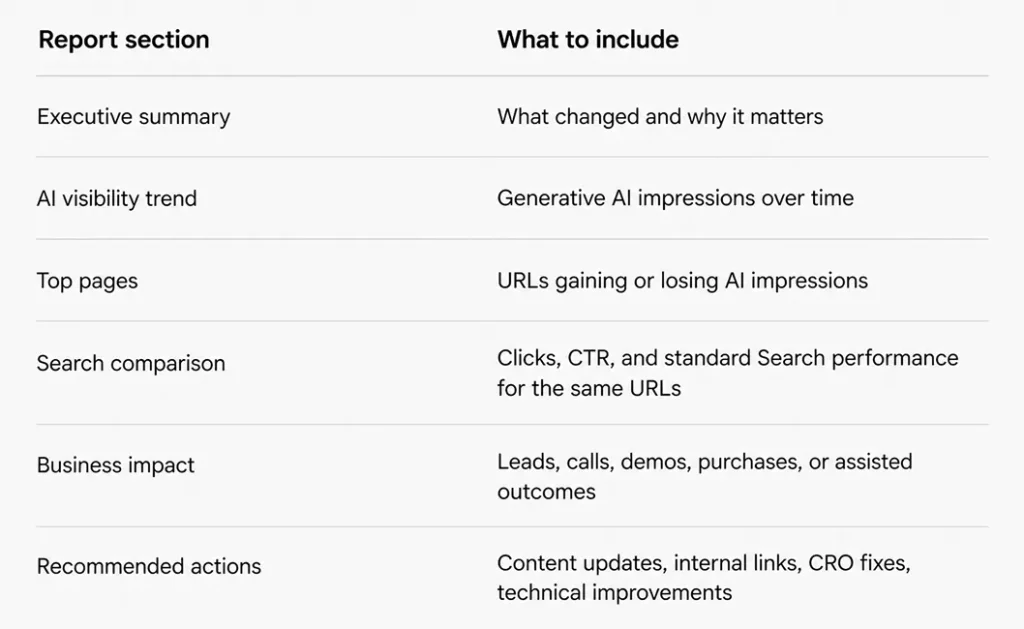
The most valuable part is the interpretation.
For example:
“AI visibility increased for our comparison guide, but the page has a weak next step for commercial readers. We should add a buyer-focused section, link to the relevant service page, and test a stronger CTA.”
That sentence turns the report into action.
Common Mistakes When Measuring AI Overviews and AI Mode
Mistake 1: Treating AI Impressions Like Traffic
AI impressions mean links to your site were shown in supported AI features. They do not mean users clicked. Keep that distinction clear in every report.
Mistake 2: Assuming Search Console Shows Every AI Citation
The generative AI report covers supported Google Search AI features, currently including AI Overviews and AI Mode. It does not replace broader AI citation monitoring across other platforms.
Mistake 3: Overreacting to Short-Term Changes
AI visibility may move as Google tests layouts, adjusts features, or changes how results appear. Use longer comparison windows whenever possible.
Mistake 4: Ignoring Page Intent
A blog post, product page, and service page shouldn’t be judged by the same conversion expectation. Match reporting to the role of the page.
Mistake 5: Optimizing for AI Visibility Without Improving the User Journey
Visibility without trust, clarity, and conversion paths will not do much for the business. The page still needs to help a human make a decision.
[Also Read: Practical Tips to Boost SEO Performance with Data-Centric AI]
Final Thoughts
AI Overviews and AI Mode are changing how organic visibility works, but they have not made SEO measurement irrelevant. They have made it more layered.
Google Search Console’s generative AI performance report gives marketers a first-party way to see when their pages appear inside supported AI search features. That visibility matters. But it shouldn’t be measured in isolation, and it shouldn’t be confused with direct traffic.
The right approach is to track AI impressions, compare them with standard Search performance, review which pages are surfacing, and connect those pages to engagement, leads, and sales.
The teams that adapt fastest will not be the ones chasing every AI-search shortcut. They will be the ones building clearer content, stronger technical foundations, better reporting systems, and tighter links between search visibility and business outcomes.
Ready to Measure Your AI Search Visibility?
AI Overviews and AI Mode are changing how customers discover brands in Google Search. Our SEO specialists help you understand where you’re showing up, what the data means, and how to turn AI visibility into qualified growth.
